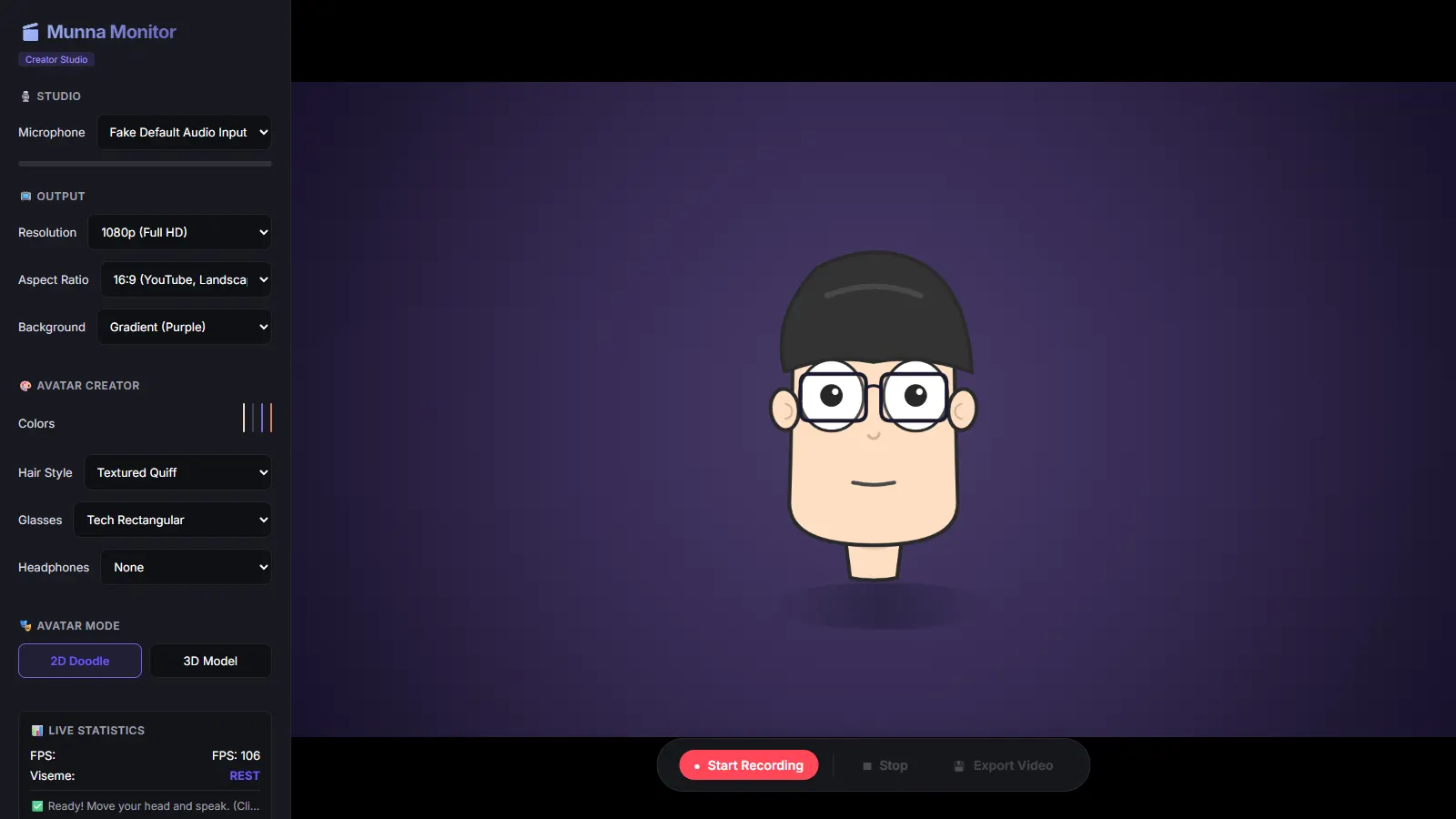
Munna Monitor is a desktop app that turns your webcam and microphone into a live animated character. Move your head and the doodle follows; speak and its mouth shapes the sounds. The same performance can drive an imported 3D model, and you can record the result to video.
The Idea
The goal was a real-time avatar creator that runs on an ordinary laptop. It needs nothing beyond the webcam and microphone already built in, tracks face and voice live, and comes with a character of its own, so there's nothing to model or rig before you start.
The project started with a hand-drawn 2D doodle and then took on a harder question. Could the same face and audio signals animate any 3D model you drop in, including models that were never rigged for speech?
What We Built
-
✦
Face tracking MediaPipe Face Mesh with refined landmarks reads head rotation and position, mouth openness, eye openness and blinks, and eyebrow height. It also classifies a coarse expression: neutral, happy, sad, surprised or thinking. An optional skeleton overlay shows what the tracker sees.
-
✦
Audio-driven visemes An audio analyser measures volume, low, mid and high-band energy, and zero-crossing rate. A viseme engine maps these to seven mouth shapes, from closed rest through open vowels to the F/V and M/B/P closures. Each shape is held for a minimum number of frames and blended over about 100 ms, so the mouth doesn't flicker.
-
✦
A speaking signal The browser's speech-recognition API runs continuously and restarts itself, giving a "currently speaking" flag. It is combined with the audio analysis in a single avatar-state engine that feeds whichever renderer is active.
-
✦
A customisable 2D doodle The default character is drawn on canvas, with live controls for skin, hair, shirt and headphone colours, plus switchable hair styles, glasses and headphones. Its eyes blink and its head turns with yours.
-
✦
3D model mode A Three.js renderer imports GLTF, GLB, FBX and OBJ files under three-point lighting, with sliders for camera distance, light intensity and scale. It ships with a built-in default head for when no model is loaded.
-
✦
Lip-sync on any mesh A geometric face detector analyses an imported mesh to locate the mouth, jaw, eyes and nose, with no ML involved. The animator then uses morph targets if the model has them, rotates the jaw bone if it has a skeleton, and otherwise deforms the mouth vertices directly.
-
✦
Record and export The avatar canvas and microphone are recorded together at 30 fps. On export, the Electron main process converts the recording to MP4 with FFmpeg when it's installed, and falls back to WebM when it isn't.
The Stack
An Electron 28 desktop shell, with a TypeScript renderer built by Vite and a preload bridge bundled with esbuild. MediaPipe Face Mesh handles face tracking, the Web Audio API handles sound analysis, and the Web Speech API provides the speaking signal. The 2D character is drawn on Canvas 2D and the 3D mode runs on Three.js. MediaRecorder captures the video, and FFmpeg in the main process handles the MP4 export. Microphone input can be switched live from a device picker.
What We Learned
The 2D doodle and the built-in 3D head both show clear, visible lip-sync driven from the webcam and microphone. Imported models showed the real limit. A static, high-poly head scan with no morph targets and no skeleton drops to the vertex-deformation fallback, and that movement is too subtle to see. Models need blend shapes or a rigged jaw to animate convincingly. The importer now reports how many mouth vertices it found and whether the model has morph targets or bones, so it's clear which animation path a model will take. The visemes are a first phase built on audio heuristics, not phoneme recognition. The speech recogniser returns a transcript, but it isn't used for mouth shapes yet. The code is public, source on GitHub.
Need something similar? Reach out. We build real-time, camera-driven experiences for desktop and the web.