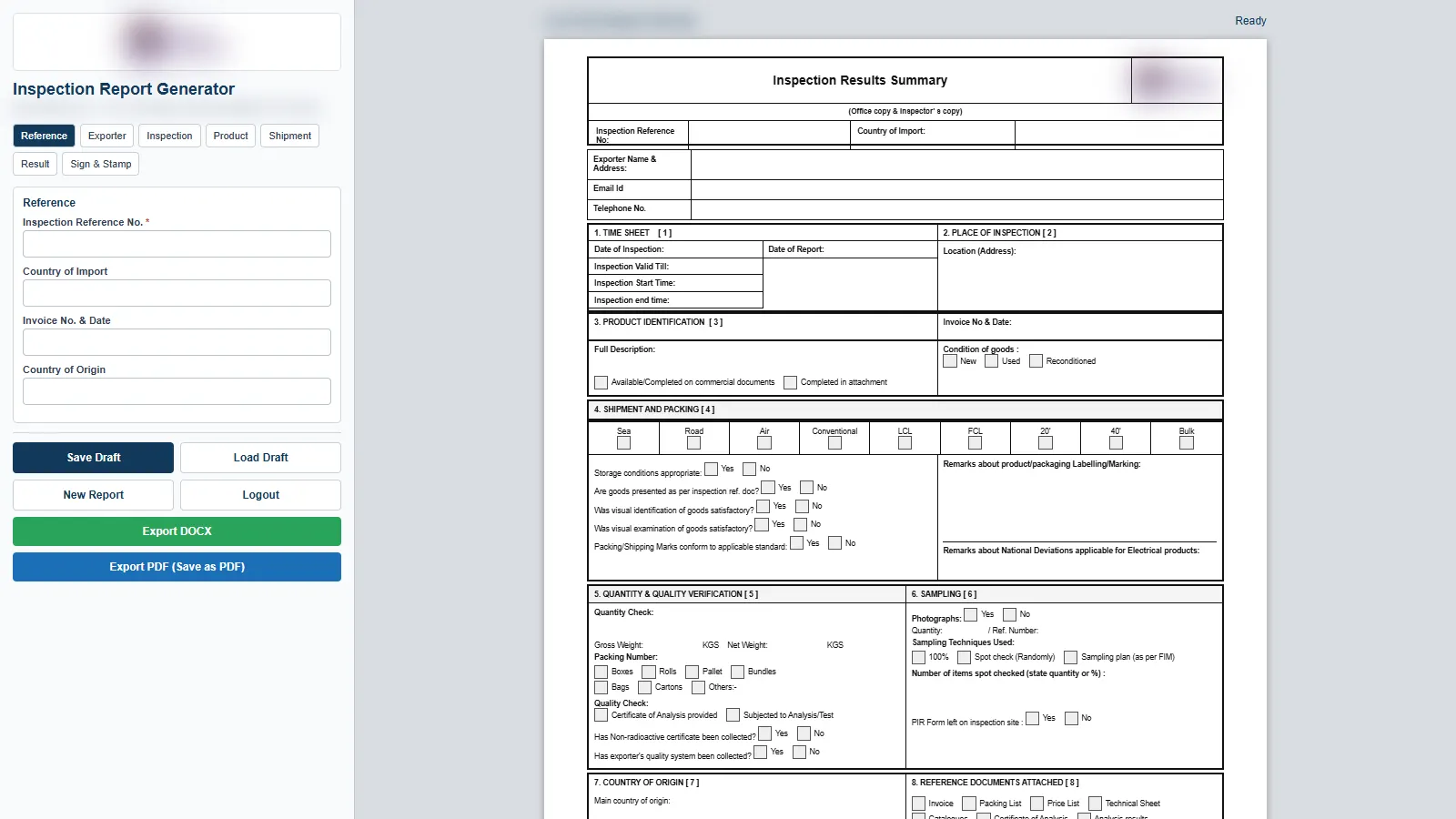
An offline browser app for an inspection and surveying firm. Inspectors fill in one form, and the app exports the firm's own inspection report as an exact-replica Word file and a matching PDF. There is no server, no database and nothing to install.
The Brief
The firm's inspection results summary existed as a Word document and an HTML mock-up of a data-entry screen. The document is dense: bordered tables, Word checkboxes, an office copy and an exporter's copy, with several values appearing on both.
Whatever replaced the manual process had to produce a document indistinguishable from the original, because the report is what leaves the office. It also had to work without an internet connection, opened straight from disk in Chrome, with nothing to install.
What We Built
-
✦
A real merge, not a redraw The template is the firm's own .docx with each dynamic value replaced by a placeholder. The browser fills it with docxtemplater, so every table, border, font, margin, header and footer is the original's. Long free text reflows onto an extra page exactly as it would in Word.
-
✦
Word checkboxes that genuinely tick The tick boxes are the document's original Word content controls. A build script tags each one, and at export the app sets its stored value and swaps the glyph, so the boxes stay live checkboxes when the file is opened in Word.
-
✦
A live A4 preview, editable on both sides The entry form sits on the left and three millimetre-accurate A4 sheets sit on the right. Both share one data object, so typing in either place updates the other immediately. Dates and times appear the way Word prints them, not the way a browser date picker would.
-
✦
The report's own rules, automated The validity date fills itself in as the inspection date plus two months, following the report's legal notes. The exporter's copy builds its description from the full description and the labelling remark. Shipment ticks for sea, road, air, FCL and LCL stay in step across both copies, and missing required fields block export with a red outline.
-
✦
Works from a double-click Chrome refuses to fetch files over file:// URLs, so the template also ships as an embedded base64 copy that is used automatically when opened off disk. Both routes produce an identical file. All libraries are vendored, so the app never needs a network connection.
-
✦
Drafts and print-ready PDF Save Draft stores the form in the browser and restores it on the next load, and New Report resets every field. The PDF comes from a dedicated print stylesheet, and the filename is pre-filled from the report's file number.
The Stack
Plain HTML, CSS and vanilla JavaScript, with no framework and no build step. PizZip reads and writes the .docx archive, docxtemplater merges the data and FileSaver triggers the download. Two dependency-free Python scripts maintain the template. One regenerates the placeholder .docx from the original and exits non-zero if anything in the source document has moved; the other rebuilds the embedded offline copy. The same folder can also be dropped on any static host, where it is served with noindex and nosniff headers.
The Outcome
Delivered as a self-contained folder that runs from a double-click, with a README covering the logo swap, required fields and template rebuilds. Two template decisions are documented and reversible. The scanned signature carried over from an earlier report was removed from both signature blocks, so a blank template never puts one inspector's signature on another's report. A typo in the original was kept for exact replication, with the one-line fix written down. The exported Word file is two pages for typical data, matching the original. A light sign-in screen keeps casual users out and is documented as a convenience, not as security.
Need something similar? Reach out — if your team still retypes the same report template by hand, we can turn it into a form that produces the finished document.